 |
 |
|
 |
|
Ever wished you could have professional looking, customized weather maps on your website?
Stop wishing and get Skymet!
Skymet is an application for METAR decoding and automatic weather map creation.
A METAR is a scheduled, coded meteorological report, issued by most large and many small
airports and heliports around the world. All in all there are well over 4000 METAR sources available worldwide!
These compact format meteorological reports are primarily intended for pilots so that they
are aware of the current weather conditions on the airports they operate at. Once you have configured it Skymet
will automatically download METAR data from the Internet, decode it and visualize it on a map in a graphical format that anyone can understand.
|
|

Skymet map example, weather conditions in The Netherlands |
|
Full automation
|
Skymet is a Windows desktop application and features automatic reloading of data and automatic FTP uploads.
Up to 11 maps and 500 weather stickers can be processed, rendered and uploaded at the same time.
You can publish weather map images on any website that supports FTP uploading. Skymet will run silently
in the background and automatically refresh the weather data on the various maps and stickers
as well as upload the relevant files at preset intervals. Quick access to the Skymet user interface
is provided through its system tray icon. |
|

Skymet main window with the Mouse-over METAR feature enabled |
|
Skymet System Requirements:
• Microsoft Windows 7/8/10
• Microsoft .NET Framework 4
• Internet connection (for downloading of METAR data)
Download a demo version of Skymet from our Download page!
|
| Click here for a map with
current weather conditions at various locations around the world. This world weather map sample
is included in the Skymet distribution package. |
|
Configuration
Skymet is configured through XML files and background maps are easily set up using the supplied XMLGen utility program. Not
only will this handy little tool generate vital portions of the XML configuration code for your weather map, it can also place location
markers in various shapes and sizes on the background map for each station that you include.
Sticker mode
A sticker mode XML file will make Skymet to print weather data for each METAR station on a separate sticker image, as opposed to printing this information
on a map grouped with weather data from other stations. This neat feature enables you to create small, completely customized and very informative weather banners which will
always contain the most recent weather information. You can use any image as a sticker background image!
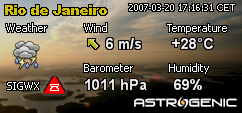
Sticker mode enbles generating individual, site specific weather data
Sticker mode XML files are processed in parallell to regular Skymet maps so no functionality is lost
if you use this feature. In total you can have one sticker mode XML with up to 500 stickers generated alongside 11 regular maps.
On-map information
Skymet can display the following weather data:
- Temperature (°C or °F)
- Wind direction
- Wind speed (m/s, km/h or mph)
- Percent relative humidity
- Barometric pressure (hPa/mb or inHg)
- Current sky conditions using weather icons
- Separate day and night time icons
- Significant weather conditions (SIGWX)
- METAR timestamp
Font faces, sizes and colors for the textual information on the map are fully configurable. The printed text can be
drawn with optional outlining in a color of your choice which can significantly improve the readability of your weather maps.
Significant weather conditions
Weather conditions that may pose a hazard to aviation are reported using special symbols.
If freezing precipitation such as rain, drizzle or freezing fog is reported at an airport, or
Cumulonimbus or Cumulus Congestus (towering cumulus) clouds have been observed, this will also
be reflected in the Skymet-generated maps and stickers.
Weather icons
Two sets of weather icons are included in the Skymet package. These icon sets,
used by Skymet to graphically present the current weather conditions, are completely replacable,
allowing you to customize your maps even further by supplying your own set of icons.
Day and night time icons
Skymet can compute the exact sunrise or sunset time for each METAR station that is shown on the map or, if the map
is covering a smaller area, a generic sunrise/sunset time can be computed for the entire map. Special icons
will be used where applicable to indicate whether it is daytime or nighttime.
Detailed user manual in PDF format
All aspects of Skymet usage and the available features are explained in
the Skymet Software Operations Guide. This user manual includes a fully linked index, a
step-by-step tutorial and example XML code to help you learn how to prepare your own maps, and
a resources section with web links to various websites containing useful tools and information.
Once you have learned how to configure Skymet the only thing you
need to do is to supply is your own background map and then spend some time
on makning your weather map presentable and unique looking.
|
Global usage and free data
Skymet works around the world, wherever you live! The weather data is obtained from a NOAA Aviation Weather Service
server in United States and is completely free of charge. Note that there are no recurring charges when using Skymet!
By buying Skymet you will be able to provide your website visitors with an outstanding and extremely appreciated weather service.
|
Availability
Skymet is only available for purchase via our webshop! The complete software installer package filesize is around 1 MB and we will e-mail you a download link as soon as your order has been processed, usually within 1-2 business days.
|
Click button to buy this item in our webshop!
 |
Please submit your questions to us via the contact form |
|


